
Stock watchlist: how to build and review your list
In short
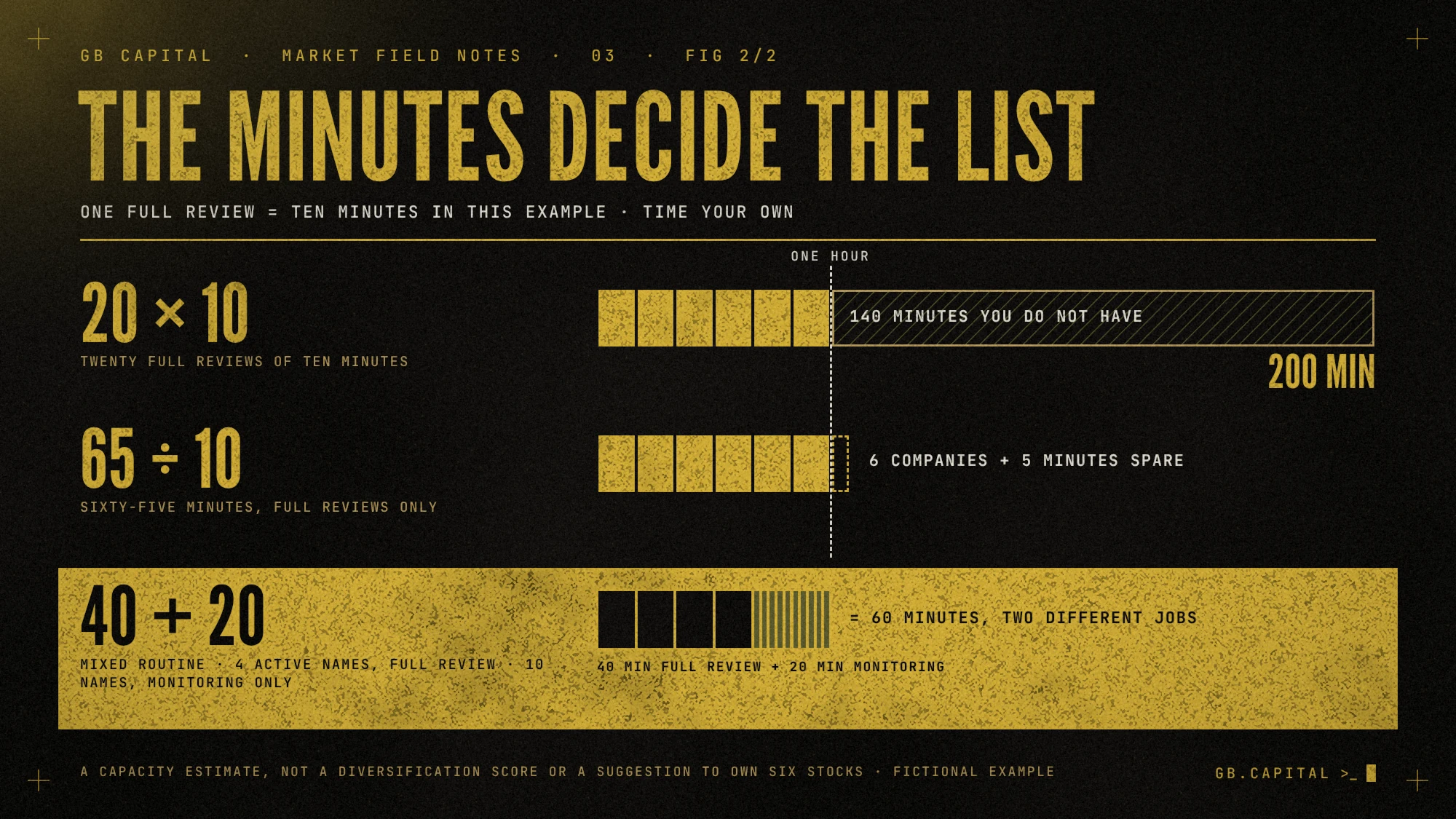
A useful stock watchlist is one you can review regularly. Estimate its size by dividing available minutes by the time needed per stock. With 60 minutes a week and 10 minutes per full review, you can cover 6 stocks; 20 would require 200 minutes. Each row needs a reason, source, next event, last-review date and status: watching, ready for review or archived.
In 2008 Brad Barber and Terrance Odean published a study in the Review of Financial Studies on the trades of individual and institutional investors. Individuals turned out to be net buyers of attention-grabbing stocks: those in the news, those with abnormally high trading volume, those with the most extreme one-day returns. Institutions showed much less of this behavior.
The authors offer a practical explanation: buying requires choosing among thousands of stocks, while selling means considering the ones you already own. Without a selection rule, attention-grabbing names can dominate the choice.
A watchlist takes that choice away from the day’s headlines, provided you can actually review all of it. A list of 300 names takes an afternoon to build, and even at two minutes per stock it needs 10 hours for a single pass. At that point you go back to watching whatever is moving, which means buying whatever is in the news.
What is a stock watchlist, and what is it for?
A watchlist is the list of stocks you follow for a specific reason, waiting for something: a price level, an event, the answer to a research question. Platforms show it as a table of tickers with price and daily change; the value lies in the columns you add yourself.
A watchlist stock deserves a defined check at a specified time. Buying it requires a trade plan and additional checks.
How many stocks should a watchlist hold?
It depends on your time, and it comes down to a division: maximum number of stocks = minutes available for one review pass ÷ minutes needed per stock. A quick check (price against your levels, date of the next event, news) takes a couple of minutes. A full review (daily and weekly chart, the company’s latest filing, updated plan) takes at least 10.
Before reading on, open your watchlist and count the rows. Then time how long it takes to genuinely review the first five, and multiply by the total.
In a hypothetical schedule, 20 stocks at 10 minutes each come to 200 minutes per pass, before deeper reading and unexpected announcements. If you have 60 minutes a week, a wider spreadsheet solves nothing.
| Minutes per week | Full review only (10 min) | Quick check only (2 min) |
|---|---|---|
| 30 | 3 | 15 |
| 60 | 6 | 30 |
| 120 | 12 | 60 |
| 240 | 24 | 120 |
The practical answer is a two-tier list. With 60 minutes you can keep 4 stocks on full review (40 minutes) and 10 on quick checks (20 minutes), which makes 14 rows you actually review. To add one, you remove another.
What should you write in each watchlist row?
Every row should tell you what to do the next time you open it. “Interesting chart” doesn’t. “Check whether revenue growth comes from volume or from an acquisition” does, because it sends you to a specific document. In the 10-K, the annual report US companies file with the SEC, the business section, the risk factors and management’s discussion of results are the first places to look. How to read those documents is in our guide to company research with primary sources and SEC filings.

Record the ticker, full name and exchange to avoid confusing stocks with similar symbols. The source and reporting period explain where a number came from. If the company does not disclose a breakdown, note the gap rather than filling it with an unlabelled guess. The last-review date tells you when the information was checked.
The exposure column is the easiest one to skip. Ten companies that depend on the same customer or the same spending cycle make ten rows and a single bet, as we explain in our guide to correlation and hidden exposure. A short label next to the sector, such as “data center spending,” is enough to see them together.
How do you choose stocks for a watchlist?
Market first
A falling market can pressure many stocks, although sectors can still diverge, and a list full of rising stocks turns within a few sessions into a list of stocks in correction. Look at the indexes first, then the stocks. In weak phases it pays to keep the list short.
Enough liquidity
A stock that trades only a few thousand shares a day may have a wide spread, making entry and exit more expensive. Check average volume and spread during the hours you trade; the criteria are in our guide to volume, liquidity and the bid-ask spread.
Trend and relative strength
A stock that holds steady or rises while its index falls shows stronger relative performance. Relative strength measures that comparison; RSI measures something different. Our guide to relative strength and RSI explains the distinction.
A catalyst and a date
Every stock on the list should have a reason for now: an earnings report, a contract, a management change, a sector rotation. Volume measures trading participation. It does not identify buyers or their motives on its own. Every known event goes in a column with its date, confirmed on the company’s investor relations site. To organise this check in TC2000, use our guide to the next earnings date.
How often should you review a watchlist?
Every session
One minute for each ready stock: price against your written levels, news, alerts triggered. If a ready stock needs more time than that, it goes back to watching.
Every week
The full pass, usually over the weekend: a full review of ready stocks, a quick check of the rest, event dates confirmed. This is when a stock changes status. When you open a position, the row leaves the watchlist and moves to your trading journal.
Every month
Once a month, archive the rows that no longer have a reason to be there and redo the minutes count. If the total is above the time you have, the list is too long, whatever the charts say.
When should you remove a stock from your watchlist?
Archive a row when you have answered the question, when the premise has changed or when you no longer have time to follow it. A row goes stale when the underlying information changes, even if the price hasn’t moved: a new report, a rescheduled event or a completed acquisition all call for a check while the chart sits still.
Archiving removes a stock from the active list while retaining its notes. If you revisit the company, start with those notes and look for updates. Consistent columns and layouts help on any platform. Our TC2000 setup grew from that need, with layouts, Market Watch and scanners refined over about two years.
How do you trim a watchlist that has grown too long?
If your list has 300 rows today, you can cut it down in four passes, in this order.
1. Ten seconds per row
For each stock, write the reason in one sentence. If it doesn’t come to you in ten seconds, the row goes to the archive. Three hundred rows at ten seconds each take 50 minutes, and this is the fastest of the four passes.
2. An exposure label
Group the remaining rows by exposure. If ten stocks depend on the same spending cycle, keep one or two, those with the best liquidity and the highest relative strength, and archive the rest.
3. A date for every event
Fill in the next-event column. Rows with earnings in the coming days move to the top of the weekly pass; rows with no event and no open question lose their reason to stay.
4. The minutes count
Assign statuses and do the math: ready stocks times 10 minutes plus watched stocks times 2. While the total is above the minutes you have, archive starting from the rows with the oldest review. With 60 minutes a week, four full reviews and ten quick checks would cover 14 stocks.
The formula distinguishes a future date within seven days from a past date and does not interpret an empty cell as an imminent event. After an event, update G manually with the next confirmed date; if no date is known, leave G empty and explain that in the note. I records the latest review, not the latest price movement.
Time one complete review before sizing the list
With 65 minutes available and ten minutes per full review, you can cover six companies with five minutes left. Include reading sources and updating notes when timing yourself. A quick price check is a different task. This calculation estimates research time; it does not determine how many stocks to own.
Frequently asked questions
How many stocks should be on a watchlist?
As many as you can review in each pass. Divide the minutes you have by the minutes each stock needs: with 60 minutes a week and 10 minutes for a full review that is 6 stocks, with 2-minute quick checks it is 30. A two-tier list, for example 4 full reviews and 10 quick checks, fits in the same 60 minutes.
How often should you update a watchlist?
A short check every session for ready stocks, a full pass every week and a cleanup every month. The weekly pass is when you confirm event dates and change row statuses; the monthly cleanup brings the minutes count back in line.
What is the difference between a watchlist and a portfolio?
A portfolio holds open positions, with money invested. A watchlist holds candidates to check, with no money invested. When you open a position, the row leaves the watchlist and management moves to your trade plan and journal.
How do you make a free stock watchlist?
A Google Sheet or Excel file is enough, with columns for ticker and exchange, name, status, reason, source, exposure, next event, levels and last review. Platform watchlists are fine for prices and alerts; the reason and the review date are better kept where you see them every time.
When should you take a stock off your watchlist?
When you have answered the question, when the premise has changed or when you no longer have time to follow it. A row also goes stale while the price sits still, for example after a new report or a completed acquisition. Archive it without deleting the notes, so if you come back you start from what you knew.
Sources and further reading
Follow the complete swing trading workflow, from market context to a written trade plan.
Turn a company article into a reviewable watchlist entry
Take our CACI company analysis as a reading exercise. Record the company and ticker, the article’s publication date, the thesis you want to test and the official filing you will check next. Add the next reporting event and a condition that would make you drop the name. Keep any price-based observation dated separately: an old article is not a current entry signal. The resulting row gives the next review a purpose. It also prevents an appealing narrative from staying in the list indefinitely after the evidence changes.